








 AMZ Sales Booster

















 Avg. +47% organic sales
 HELP CENTER



- Introduction
- Is This You? Quick Self-Diagnosis
- Why Amazon Organic Sales Drop: 4 Real Causes
- What This Organic Traffic Loss Is Actually Costing You
- How to Recover Amazon Organic Sales: A 4-Phase Fix
- What Most Sellers Miss About Amazon SEO Optimization
- When DIY Amazon SEO Optimization Stops Making Sense
- Frequently asked questions
- Conclusion
Introduction
Your Amazon organic sales are dropping. Not dramatically, not all at once. Just a slow, steady slide that you first noticed two months ago, hoped would reverse, and is now clearly not reversing on its own.
You’ve refreshed the listing. Adjusted bids. Tweaked keywords. The needle moved for a week, then went right back down. If that’s where you are, you’re not dealing with a tactics problem. You’re dealing with a diagnosis problem.
This page explains why Amazon organic sales drop for established sellers, what specifically is causing yours, and the exact sequence to fix it. No filler, no 17-tip checklist. Just a clean diagnosis and a path forward.

Is This You? Quick Self-Diagnosis
If two or more of these describe your last 30 days, keep reading:
- Amazon’s organic sales are dropping month over month despite no major listing changes
- Keyword rankings slipping on your top 2-3 search terms
- Sessions are holding steady, but the Amazon conversion rate is quietly falling
- BSR is slowly drifting upward (worse) in your main category
- PPC spend is increasing just to maintain the same revenue
- Organic traffic loss on Amazon that started after a competitor entered or relaunched
- New reviews are coming in, but velocity feels like it’s slowing
- A+ content refreshed, title updated, and sales still declining
Why Amazon Organic Sales Drop: 4 Real Causes
Forget the generic lists. At this stage, Amazon’s organic sales decline for one of four reasons. Sometimes two are stacked together. Rarely all four.
Cause 1: Ranking Decay (Visibility Problem)
Your hero keyword used to land you on page 1, position 5. Now you’re in position 14. Page 2. And you didn’t change anything.
Here’s what most sellers miss: Amazon’s A9/COSMO algorithm doesn’t just reward your sales. It rewards your sales velocity relative to the other listings on that page. If a competitor starts converting faster than you on the same keyword, they move up. You move down. Your absolute sales can stay the same, and your Amazon keyword rankings can still drop.
This is the most common cause of organic traffic loss for Amazon sellers in the $30k-$150k per month range. You’re not getting worse. The competition around you got better, and the algorithm noticed.
Quick Diagnosis: Pull your organic rank for your top 5 keywords today. Compare it to 90 days ago using Helium10, Data Dive, or a logged-out manual search. If the rank dropped 5+ positions on any hero keyword, you have a visibility problem.
Cause 2: Conversion Rate Decline (Conversion Problem)
Same traffic, fewer orders. Your unit session percentage used to sit at 18%. Now it’s 12%. That’s a conversion problem, not a ranking problem, and the fix is completely different.
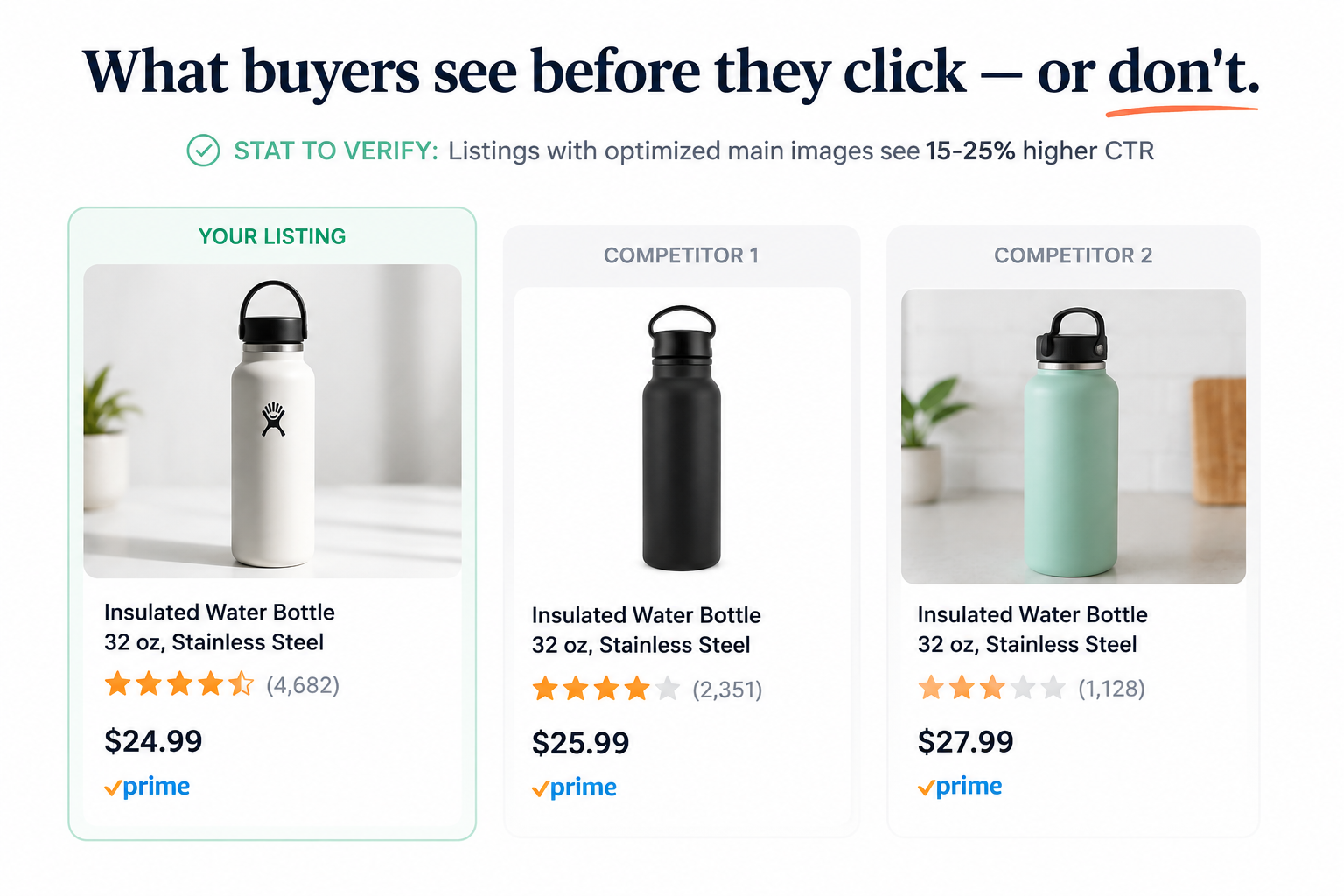
Conversion ceilings usually come from one of three things: a competitor refreshed their main image, and yours now looks outdated side-by-side in search results; your star rating dipped from 4.6 to 4.3, and you didn’t notice; or a price gap opened while you weren’t watching.
Most sellers check their own listing regularly. Almost none look at the search result page the way a buyer does, with three or four thumbnail images sitting next to each other. That’s exactly where the Amazon listing performance loss is happening.
Cause 3: Keyword Footprint Saturation (Velocity Problem)
Traffic is fine. The Conversion rate is fine. But you can’t break above a certain daily unit count, no matter what you try. This is the trickiest one to spot.
What’s happening: your listing is indexed for a small cluster of keywords, and you’ve hit the ceiling of demand on those terms. You’re not losing. You’ve just exhausted your current keyword surface area.
The fix isn’t more PPC spend on the same keywords. It’s expanding the keyword footprint so new buyers, searching different queries, can find you. Most sellers double down on what’s already working and can’t figure out why the line stays flat.
Cause 4: Amazon Algorithm Changes (External Pressure)
Sometimes the listing is genuinely fine, and something shifted at Amazon’s end. The A9/COSMO algorithm gets updated regularly, and those Amazon algorithm changes can reshuffle rankings in ways that have nothing to do with what you did or didn’t do.
Other times it’s market-level pressure: a well-funded competitor launched, an aggregator bought your top rival and started running aggressive PPC, or a category-wide pricing reset after a major sale event.
You can’t out-tactic a structural shift. But recognizing one changes your response entirely: stop trying to optimize the same listing and start thinking about differentiation or relaunch instead.
What This Organic Traffic Loss Is Actually Costing You
Sellers consistently underestimate this number.
Say you’re doing $70k per month at a 20% net margin. That’s $14k in monthly profit. A 6-month slide where you ‘should’ have grown 12% per quarter didn’t cost you zero. It cost you the $25k+ in compounded profit that trajectory would have produced, plus the Amazon search visibility you used to own, which a competitor now holds and won’t give back cheaply.
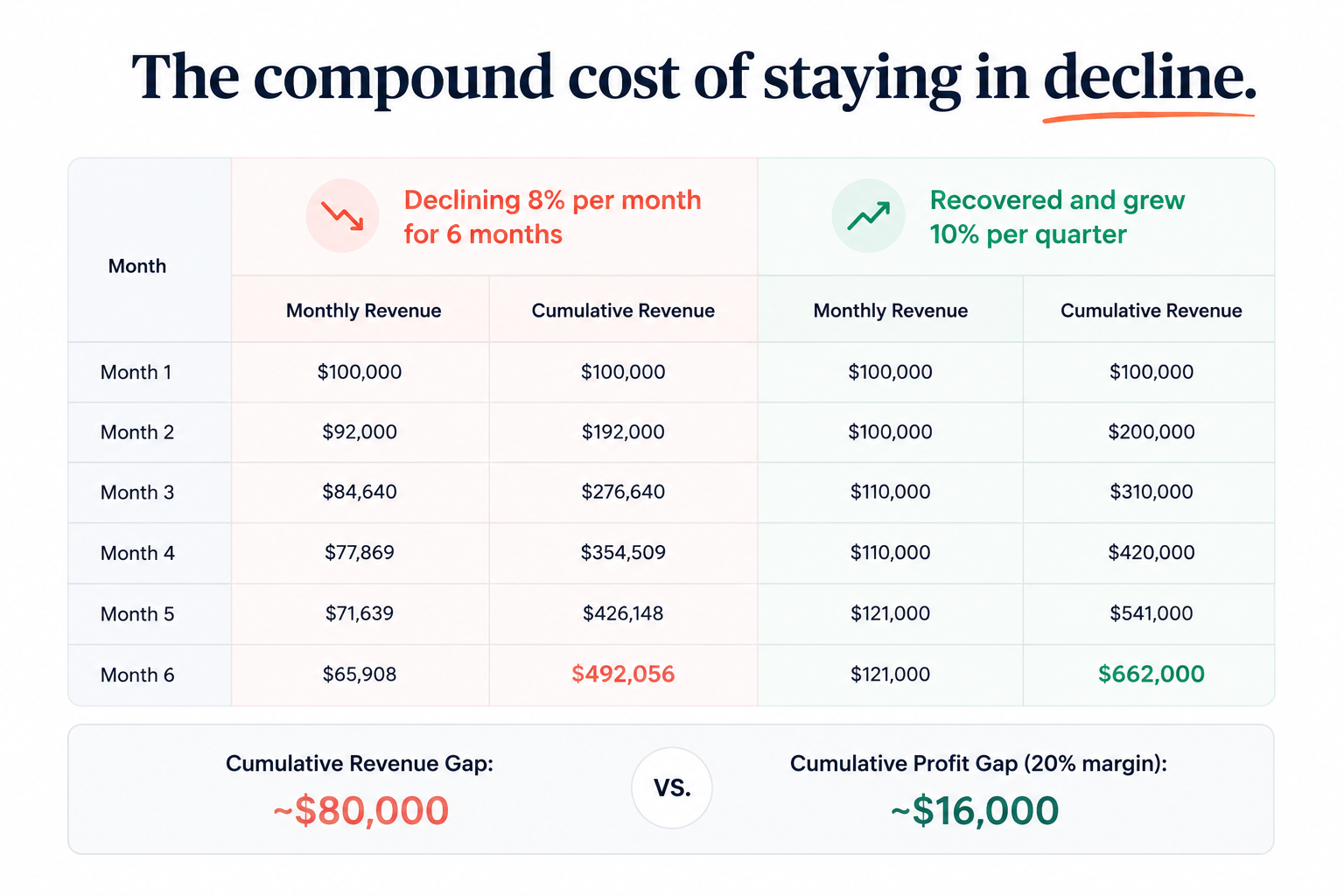
The compounding piece is what stings most. Amazon’s algorithm rewards upward trajectory. A listing that’s been sliding for 4 months gets quietly deprioritized against a listing that’s been climbing, even if the declining listing has stronger absolute reviews or a better price. The algorithm reads momentum. A drop isn’t neutral. It accelerates.
How to Recover Amazon Organic Sales: A 4-Phase Fix
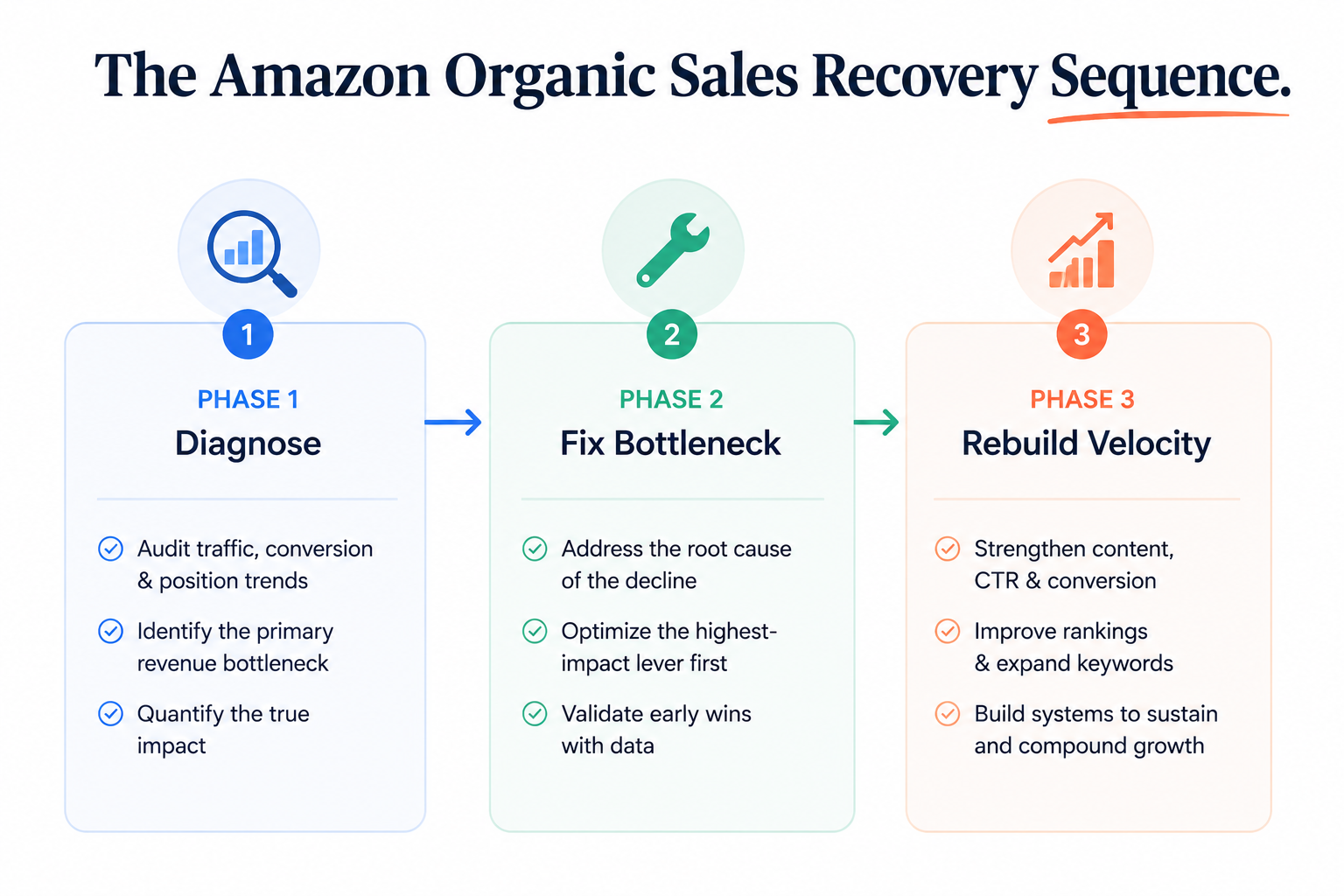
There’s no universal tip list. There’s a sequence. Skip a phase, and you’ll spend money fixing the wrong layer.
Phase 1: Diagnose Which Problem You’re Actually Solving
Before changing anything, pull three numbers from your last 90 days of business reports:
- Sessions (Detail Page Sales and Traffic by Child Item)
- Unit Session Percentage (your actual conversion rate)
- Organic rank for your top 5 keywords (use Helium10, Data Dive, or a manual logged-out search)
Compare each number to the same window 90 days earlier. The one that dropped most tells you where to start:
- Sessions dropped: visibility problem, work on Amazon SEO optimization, and rank recovery
- Session stable, unit session % dropped: conversion problem, work on listing creative
- Both stable, units flat: velocity/footprint problem, expand keyword surface
Pro Tip: Don’t fix all three at once. You’ll spend twice the money and have no idea what worked. Diagnose first, then fix one bottleneck at a time.
Phase 2: Fix the Bottleneck — Not the Whole Listing
This is where most sellers go wrong. They rebuild the entire listing because someone on a podcast told them to. That’s usually wasteful.
- If it’s a visibility problem: Audit your indexation gap (keywords you should rank for but currently don’t), then run a targeted 30-day rank push on the 3 keywords sitting just below your top performers. Those move first. Don’t start with your hero keyword.
- If it’s a conversion problem: Don’t touch the copy yet. Start with the main image and star rating block. Those two elements drive roughly 80% of the click-to-purchase decision. A fresh main image alone can move conversion 15-25% on a tired listing.
- If it’s a velocity problem: Expand the keyword footprint. Run a back-end search term refresh, update your A+ modules with buyer language you’re not currently ranking for, and optimize and launch PPC campaigns targeting competitor ASINs and adjacent category terms you’ve been ignoring.
Phase 3: Run a Velocity Push to Reset the Algorithm
Once you’ve fixed the bottleneck, you need a 30-60 day velocity push to reset how Amazon reads your listing. The algorithm doesn’t care that you improved the listing. It cares that the listing is now converting and selling faster than the listings around it.
That usually means a coordinated effort:
- Tighten PPC targeting around the keywords you just fixed
- Run a 10-14-day price test to stimulate conversion rate
- Drive an external traffic burst (email list, TikTok, deal site) to spike sessions
Key Insight: The goal isn’t a great-looking listing. The goal is a listing that’s clearly moving up in Amazon’s eyes. Those are different things, and almost no seller makes this distinction.
Phase 4: Decide If This Is a Relaunch, Not a Fix
Sometimes the math says rebuild from zero. If your conversion rate is below 8%, your hero keyword rank is past page 2, and your star rating is below 4.3, you’re trying to revive a listing the algorithm has already written off.
In that case, a full product relaunch (new main image, new title, new keyword architecture, fresh review velocity campaign) is faster than another six months of incremental fixes. The relaunch path is harder, but it’s the right path if all three of those conditions are true.
What Most Sellers Miss About Amazon SEO Optimization
Two patterns separate sellers who recover Amazon organic sales from sellers who keep optimizing without results.
Insight 1: The Conversion Rate Threshold Effect
Amazon’s algorithm appears to treat unit session percentage as a step function, not a smooth curve. In most categories, listings converting below 10% get quietly demoted. Listings between 10-15% hold rank. Listings above 15% get promoted.
STAT TO VERIFY: thresholds vary by category, but the step-function pattern is consistent.
That means a listing at 9.5% and a listing at 10.5% are not ‘basically the same.’ They’re on opposite sides of a ranking decision. If you’re hovering between 9-10%, the highest-ROI move you can make is getting to 12%, not from 12% to 16%.
Insight 2: Review Velocity Beats Review Count
A listing with 600 reviews getting 2 new reviews a week is losing to a listing with 90 reviews getting 8 new reviews a week. Amazon’s algorithm reads recent review velocity as a signal of current market relevance. Old reviews don’t keep working for you indefinitely.
If you have 500+ reviews and zero in the last 30 days, the algorithm reads your listing as fading, even if your overall star rating looks great. This is one of the quietest causes of Amazon listing performance decline, and almost no tool company blog covers it.
Key Insight: When your Amazon organic sales are dropping, your real enemy isn’t the quality of your listing. It’s the trajectory of your listing in Amazon’s eyes. Recovery means making the algorithm see a listing on the rise, not just a listing that looks better than it did last month.
When DIY Amazon SEO Optimization Stops Making Sense
If you’re past $30k per month, the cost of staying in decline is almost certainly higher than the cost of bringing in someone who does this every day. Six months of lost momentum means compounding profit you won’t recover, and keyword rankings a competitor now owns.
The real value of expert help at this stage isn’t the tactics. You probably know most of them. It’s the diagnosis speed, the execution sequence, and the velocity push that run correctly, so the algorithm actually responds instead of shrugging.
If you’d rather have a team handle the diagnosis and recovery, that’s exactly what a full-service Amazon optimization engagement covers: root cause identification, listing rebuild, PPC restructuring, and the velocity campaign, run as one coordinated push instead of three disconnected projects.
Frequently asked questions
1. Why are my Amazon organic sales dropping even though my listing looks fine?
Because Amazon ranks listings against competitors, not against your past performance. If competitors improved their images, reviews, pricing, or conversions while you stayed the same, your rankings and sales can drop
2. How do I recover lost Amazon keyword rankings?
Audit your top keywords, identify the biggest ranking drops, and focus on 2–3 priority terms. Support them with targeted PPC, pricing tests, and external traffic to rebuild momentum. Results often appear within 2–4 weeks.
3. What causes a decline in Amazon's organic traffic?
Usually one of three reasons: lower keyword rankings, reduced click-through rates (images, reviews, pricing), or stronger competitor targeting. Find the root cause first, then optimize accordingly.
4. Does Amazon’s algorithm affect organic rankings every time it updates?
Yes. Algorithm updates can change how Amazon weighs factors like conversions, reviews, sales velocity, and external traffic. Ongoing optimization is essential to maintain rankings.
5. Is my organic traffic loss an Amazon algorithm change or a listing problem?
Check your traffic data. A sudden drop often points to an algorithm update, while a gradual decline usually signals listing performance issues or increased competition.
Conclusion
If your Amazon organic sales are dropping month after month, the answer isn’t another round of generic tips. It’s figuring out exactly which of three bottlenecks is yours: visibility decay, conversion rate decline, or keyword footprint saturation. Then, fixing that one in the right sequence, with a velocity push that gives the algorithm a clear signal that your listing is moving up.
Diagnose first. Fix the actual bottleneck. Run the velocity push. That’s how sellers at your level stop the slide and get organic sales moving again. If you’d rather not run that sequence yourself, that’s exactly what a focused Amazon SEO optimization engagement is built to do.


