





 AMZ Sales Booster















 Avg. +47% organic sales
 HELP CENTER


- Introduction
- Is This You? What a Stalled Launch Looks Like
- Why Amazon Launches Fail (The Real Reasons)
- What a Stalled Launch Is Costing You Right Now
- How to Relaunch a Product on Amazon (Step by Step)
- What Most Sellers Miss During a Relaunch
- When You Need Help with the Relaunch
- Frequently asked questions
- The Bottom Line
Introduction

You did everything right. You researched the product. You set up the listing. You launched.
And then… nothing. No orders, or maybe a trickle that stopped after week one.
If your Amazon product is not selling after launch, the problem isn’t bad luck. There’s a specific reason your listing didn’t take off, and most sellers never find it because they start changing things before they diagnose anything.
This page breaks down why launches fail, how to tell which failure type you have, and the exact sequence to fix it and get real traction.
Is This You? What a Stalled Launch Looks Like
If your Amazon product launch strategy didn’t go as planned, one of these usually describes where you are right now:
- You launched 2 to 6 weeks ago and have had zero or single-digit orders
- Your PPC ads are getting clicks, but no one is buying
- Your product is not showing up in Amazon search after launch, even for your own keywords
- You had a few sales in the first week, and then orders completely stopped
- Your BSR is non-existent or slowly getting worse
- You’re spending on ads, but your organic rank hasn’t moved
- Competitors with fewer reviews are ranking above you for your main keyword
- Your product is stuck after launch on Amazon, and you don’t know which lever to pull
If two or more of those describe your situation, you’re in the right place. Each one of those symptoms has a specific cause behind it, and the fix depends on which cause is actually yours.
Why Amazon Launches Fail (The Real Reasons)
Most articles about Amazon’s product launch strategy focus on what to do before launch. Very few talk honestly about why launches fail after the product goes live.
There are four root causes. Almost every stalled launch comes back to one of them.
Cause 1 – You Missed the Honeymoon Window (Velocity Problem)
 Amazon gives every new listing a short window, often called the “honeymoon period,” where it gets boosted visibility to test how buyers respond. This window is roughly the first 2 to 4 weeks after launch.
If your listing doesn’t convert during that window, Amazon pulls the visibility boost, and the listing settles into a low-rank position that’s very hard to recover from organically. This is the most common reason sellers end up with a product stuck after launch on Amazon.
Here’s what makes this painful: you can’t undo a missed honeymoon window just by improving the listing. You need a deliberate relaunch to reset the signal Amazon has about your product’s performance.
Cause 2 – Your Listing Isn’t Indexed for the Right Keywords (Indexation Problem)
This one catches a lot of sellers off guard. Just because you put a keyword in your title doesn’t mean Amazon is indexing your listing for it.
If your listing is not showing up in Amazon search after launch for your target keywords, there’s a good chance you have an indexation gap. You’re invisible to every shopper searching those terms. And if you’re running PPC for keywords you’re not indexed for organically, you’re paying premium rates for impressions that barely convert.
Check your indexation by searching: your ASIN + your primary keyword in Amazon search. If your product doesn’t appear in the results, you’re not indexed. This is fixable, but you have to know it’s the problem first.
Cause 3 – Your Listing Isn’t Converting (Conversion Problem)
Your Amazon ads are getting clicks but no sales. That’s not an ad problem. That’s a listing problem.
When shoppers land on your page and leave without buying, Amazon reads that as a negative signal. The more it happens, the lower your listing ranks and the more expensive your ads become. It’s a compounding problem.
The three most common conversion killers on a new listing are:
- A main image that doesn’t stand out in the search results compared to competitors
- Zero or very few reviews when competitors on the same page have 50, 100, or more
- Bullet points that describe features but don’t answer what the buyer is actually wondering
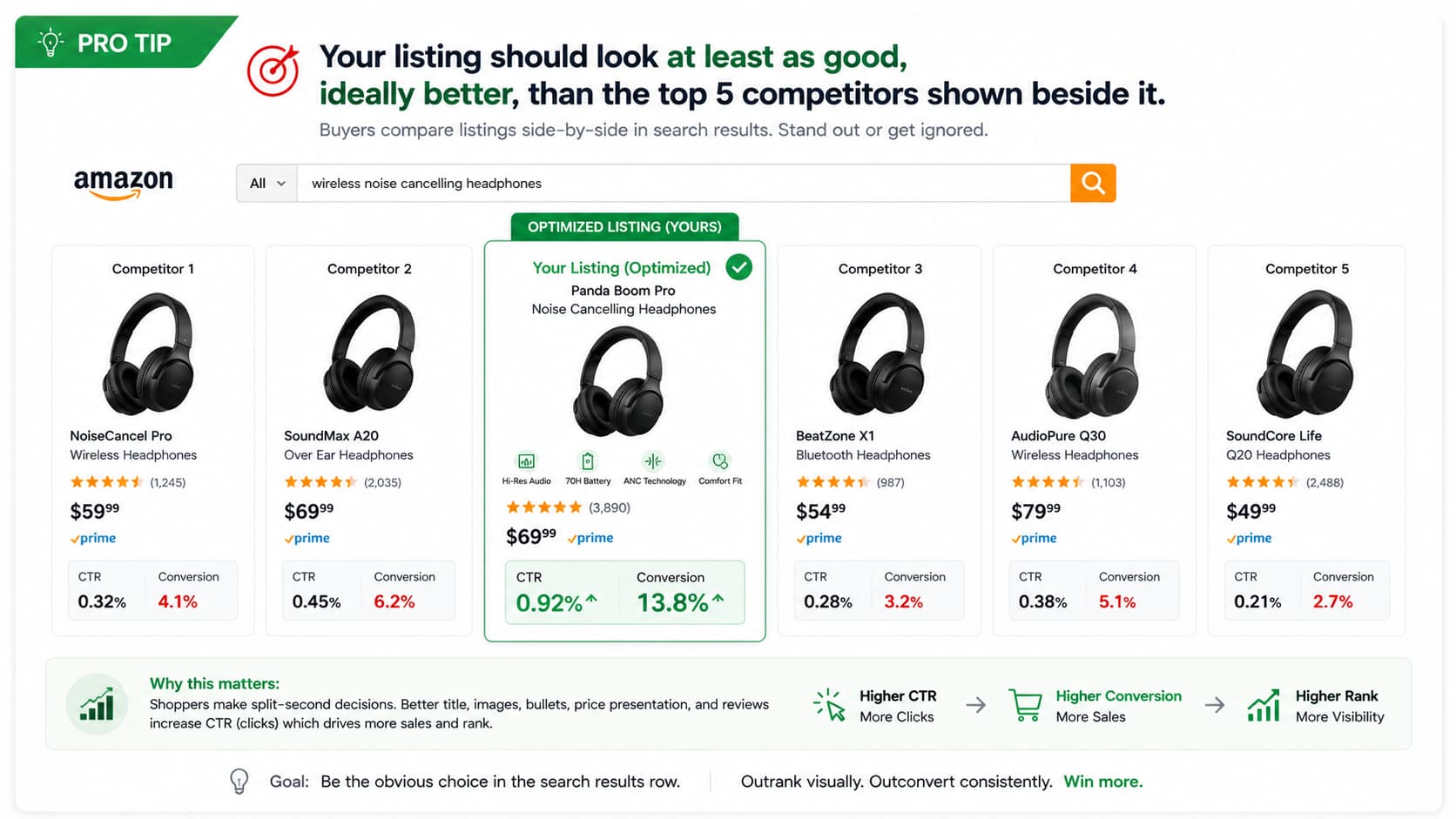
Most sellers assume conversion is fine because the listing “looks good.” But looking good in isolation isn’t the test. The test is how it looks next to four other products in a search result row.
Cause 4 – Your Launch Strategy Didn’t Generate Enough Early Velocity (Momentum Problem)
Amazon’s algorithm needs to see sales to give you more visibility. Sales generate visibility. Visibility generates more sales. That flywheel has to start somewhere.
If your new product is not ranking on Amazon, it’s often because the launch didn’t generate enough concentrated early sales to kickstart the flywheel. Launching with one PPC campaign and hoping organic sales follow isn’t a strategy. It’s a gamble, and it usually doesn’t pay off in competitive categories.
A proper launch needs coordinated momentum: ads, a pricing strategy for the first 2 weeks, a review-generation plan, and ideally some external traffic to signal demand from outside Amazon.

How to Relaunch a Product on Amazon (Step by Step)
Step 1 – Diagnose Before You Change Anything
Pull your data before you touch the listing. You need three things from your Seller Central account:
- Sessions from Business Reports (Detail Page Sales and Traffic by Child Item)
- Unit Session Percentage from the same report (this is your conversion rate)
- Organic rank for your top 3 to 5 keywords (use Helium 10 or a manual search from a logged-out browser)
If sessions are under 10 per day, you have a visibility or indexation problem. If sessions are okay, but the unit session percentage is below 8%, you have a conversion problem. If both are flat, you have a velocity problem. Don’t fix the wrong layer.
Step 2 – Fix the Indexation Gap First
Before anything else, confirm your listing is indexed for the keywords you’re targeting.
Search your ASIN combined with each of your top 5 keywords in Amazon’s search bar. If your product doesn’t show up, fix your backend search terms and title to include that keyword, then wait 24 to 48 hours and check again. This is a fast fix that can immediately open up organic impressions you were missing.
Go through this indexation checklist:
- Primary keyword appears naturally in the title
- Backend search terms are filled (up to 250 bytes) with no repeated words
- Subject matter fields and intended use fields are filled in Seller Central
- No prohibited terms or competitor brand names in backend fields
- A+ content includes keyword-rich text modules, not just images
Step 3 – Rebuild the Listing if Conversion Is the Problem
If your sessions are decent but the unit session percentage is under 8%, the listing itself is the bottleneck.
Start with the main image. It’s the single highest-leverage fix for a new product not ranking on Amazon or not converting. Your main image needs to be visually dominant at thumbnail size, not just at full zoom. If it looks similar to three competitors in the same row, buyers won’t click yours.
Then check your bullet points. Each one should answer a specific buyer question or concern, not just list a product specification. “BPA-free material” is a spec. “Safe for kids, dishwasher-friendly, and won’t crack after repeated use” is a buyer concern answered.
Amazon listing optimization service
Step 4 – Run a Coordinated Velocity Push
Once the listing foundation is solid, you need to generate concentrated sales momentum to reset Amazon’s algorithm reading of your product. This is the actual relaunch.
A coordinated velocity push includes:
- Tightened PPC campaigns focused on your top 3 exact-match keywords, not broad campaigns bleeding budget
- A launch price adjustment for 10 to 14 days to lower the conversion barrier and improve the unit session percentage
- Amazon Vine enrollment if your brand is registered and has fewer than 30 reviews
- An external traffic push from social media, an email list, or a deal site relevant to your category
The goal is a 14 to 30-day window where your listing shows Amazon a clear positive signal: sessions are up, conversion is healthy, and units are moving. That’s what shifts organic rank.
Step 5 – Track Weekly and Adjust
During and after the relaunch, check three metrics every week: sessions, unit session percentage, and organic rank for your top 3 keywords.
If sessions are climbing but conversion is flat, the visibility fix worked, but the listing still needs attention. If conversion looks good but sessions are flat, the algorithm hasn’t fully responded yet. Give it another week before changing anything. Changing too many variables at once makes it impossible to know what’s working.
What Most Sellers Miss During a Relaunch
Two patterns separate sellers who successfully relaunch from those who do a relaunch and end up in the same place three months later.
They Fix the Listing But Not the Velocity Signal
A better listing alone won’t move your rank. Amazon doesn’t re-rank listings because they look nicer. It re-ranks them because buyers are responding to them better, and it knows that through purchase data.
If you rebuild the listing but don’t run a deliberate sales push at the same time, you may get a small conversion improvement, but the organic rank won’t shift meaningfully. The listing fix and the velocity push have to happen together. That’s the part most DIY relaunches miss.
They Relaunch on the Wrong Keywords
A failed launch often means the original keyword targeting was wrong. If your launched product has no orders on Amazon and you relaunch targeting the same keywords at the same bid levels, you’ll likely get the same result.
Before the velocity push, audit your keyword set. Are you targeting terms where the top 10 results all have 500+ reviews? If yes, you’re in a keyword bracket you can’t compete in yet. Find the adjacent terms with real search volume and lower competition, rank on those first, then push toward your main keyword as velocity builds.
When You Need Help with the Relaunch
If you’ve tried adjusting the listing, running PPC, and your Amazon product is still not selling after launch after 45 to 60 days, the problem is almost always a diagnosis issue, not an effort issue. You’re likely fixing the wrong layer.
Getting an outside perspective matters at this stage. Someone looking at your listing, your keyword data, and your Business Reports without being attached to the original launch decisions can spot the actual bottleneck quickly. That’s usually what unlocks a stalled product, not another round of the same fixes.
Panda Boom works with sellers who’ve hit this wall. We run the diagnosis first, identify whether the issue is indexation, conversion, velocity, or the keyword strategy, and then build and execute the relaunch as a coordinated push instead of a series of disconnected experiments.
Frequently asked questions
1. Amazon product not selling after launch - how long should I wait before relaunching?
Don’t wait past 30 days if you have under 10 orders and no upward trend. The longer you wait, the harder recovery gets.
2. Why is my product not showing up in Amazon search after launch?
Most likely an indexation gap. Search your ASIN plus your main keyword on Amazon — if it doesn’t appear, fix your title and backend search terms immediately.
3. My Amazon ads are getting clicks but no sales - what's wrong?
That’s a listing problem, not an ad problem. Start with your main image and review count before you spend another dollar on PPC.
4. What's the difference between a product refresh and a full Amazon product launch strategy relaunch?
A refresh updates the listing. A relaunch fixes the listing and drives coordinated sales velocity at the same time. One moves rank, the other usually doesn’t.
5. How long does it take to see results after you relaunch a product on Amazon?
Conversion fixes show up in 1 to 2 weeks. Full organic rank recovery typically takes 60 to 90 days, done right.
6. Can I relaunch a new product not ranking on Amazon without spending more on ads?
You can spend less, but not zero. Fix your conversion rate first so every click you pay for is far more likely to turn into a sale.
Why Your Amazon Listing Is Not Showing in Search (The Real Causes)
If you’ve launched a product but have no orders on Amazon, the answer isn’t to wait longer or run more ads at the same listing. It’s to diagnose which of the four failure types you’re dealing with: a missed velocity window, an indexation gap, a conversion problem, or a weak launch strategy. Then fix the right layer in the right sequence.
Diagnose first. Fix the actual root cause. Then push coordinated velocity so Amazon’s algorithm sees a listing that’s accelerating, not stalling.
If you’d rather not run that process alone, that’s exactly what Panda Boom does.


