








 AMZ Sales Booster

















 Avg. +47% organic sales
 HELP CENTER

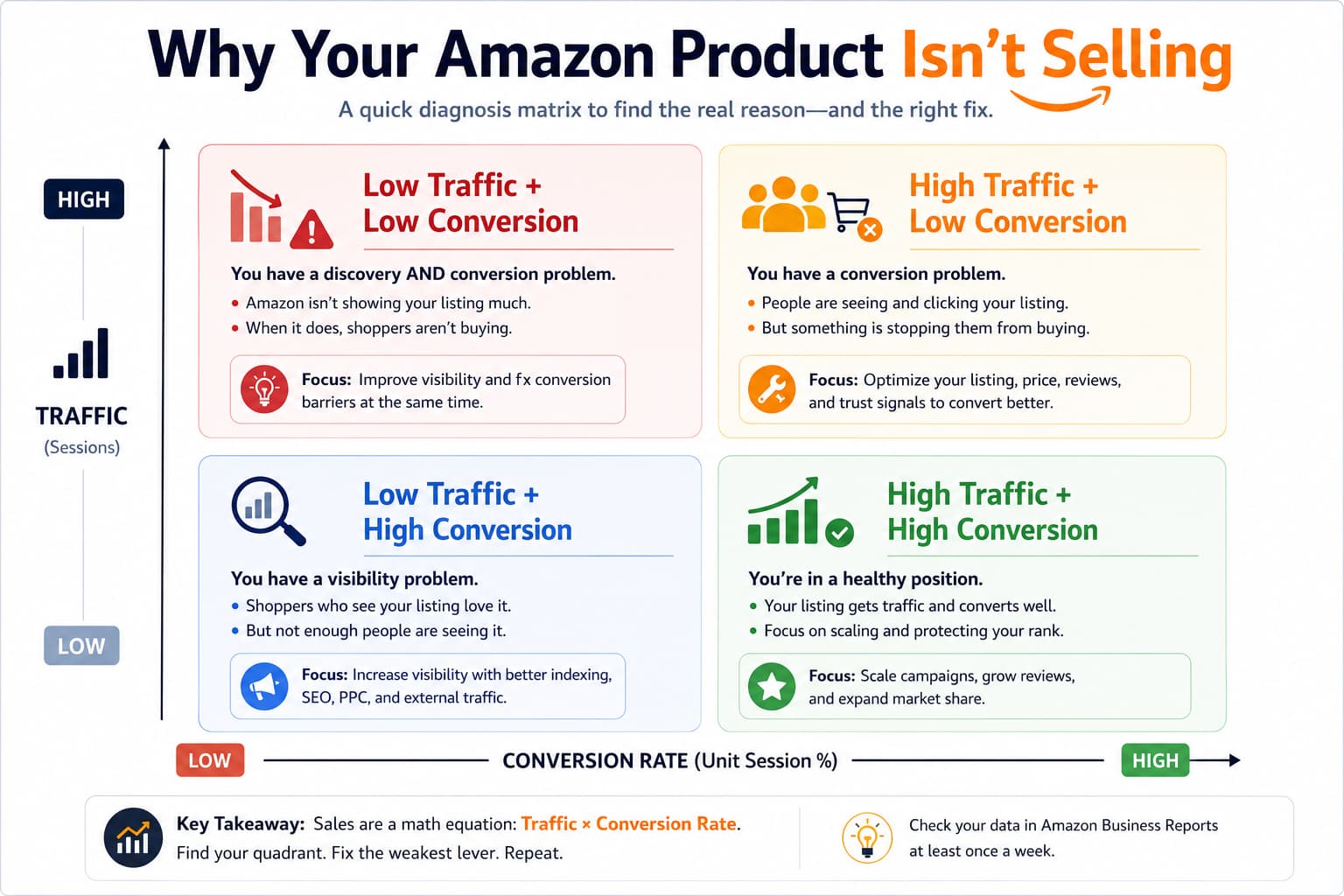

Which One Is Killing Your Sales?
And nothing.
If your product is not selling on Amazon, or barely moving after weeks on the platform, you’re not alone. But the reason it’s not selling is rarely what sellers think it is at first.
This page will help you figure out exactly what’s broken and give you a practical path to fix it. No generic tips. Just a real diagnosis.

Is This You? Quick Self-Check
If my product is not selling on Amazon, one of these usually describes what you’re seeing:
- You launched 2 to 4 weeks ago and have had zero or near-zero sales
- You’re getting clicks, but no one is buying
- Your listing shows up in search, but your BSR is terrible or non-existent
- You’ve tried lowering the price, and it didn’t help
- You’re running PPC, but the spend has no return
- Your product is listed under the wrong category
- You have no reviews, and competitors have hundreds
- Traffic is coming from ads, but organic traffic is flat
If two or more of those sound familiar, keep reading. There’s a specific cause behind each one, and they each need a different fix.
Why Your Product Is Not Selling on Amazon (The Real Causes)
Most sellers who search “why is my product not selling on Amazon” land on articles that say things like “optimize your title” or “get more reviews.” That advice isn’t wrong. It’s just incomplete.
The real causes fall into four categories. You need to know which one is yours before you start changing things.
Cause 1 – You’re Not Getting Found (Visibility Problem)
This is the most common cause for new products. Your listing exists, but Amazon’s algorithm hasn’t decided to show it to buyers yet.
Amazon ranks products based on sales velocity and relevance history. A brand new listing has neither. So Amazon shows it to a tiny slice of shoppers to test it. If those early sessions don’t convert, the listing gets buried.
Here’s what a visibility problem looks like in your data: pull your Business Reports. If your sessions are under 10 to 20 per day in a competitive category, you have a visibility problem, not a conversion problem. Fixing the copy won’t help if nobody’s seeing the listing in the first place.
Cause 2 – People Are Clicking But Not Buying (Conversion Problem)
This one’s trickier. You have traffic, but your unit session percentage is sitting at 5% or 6% when it should be 12% to 18% for a healthy listing.
Three things kill conversion on an otherwise fine listing:
- A weak main image that doesn’t stand out next to competitors in search
- Too few reviews, or a star rating below 4.0
- A price that looks out of place relative to what the rest of the page is offering
The main image is where most sellers underestimate the problem. Say you’re selling on Amazon in the kitchen gadgets space. You have a product photo on a white background. The competitor next to you has a lifestyle image showing the product in use, in a real kitchen. Buyers click theirs. Not yours. That’s a conversion problem, and it’s showing up as a sales problem.

Cause 3 – Your Listing Has Structural Problems (Listing Quality Problem)
This one affects both visibility and conversion at the same time.
If your title is keyword-stuffed and unreadable, your bullets are vague, your backend search terms are empty, or your A+ content is missing, Amazon’s algorithm gives your listing a lower relevance score. Fewer impressions. Less organic traffic. Lower conversion. All of it feeds the same problem.
Our newest product is just not selling is often not a launch problem. It’s a listing-built-wrong problem. You can put ad spend behind a weak listing, but you’re paying full price for half the result.
Cause 4 – Your Pricing Is Off (Competitive Positioning Problem)
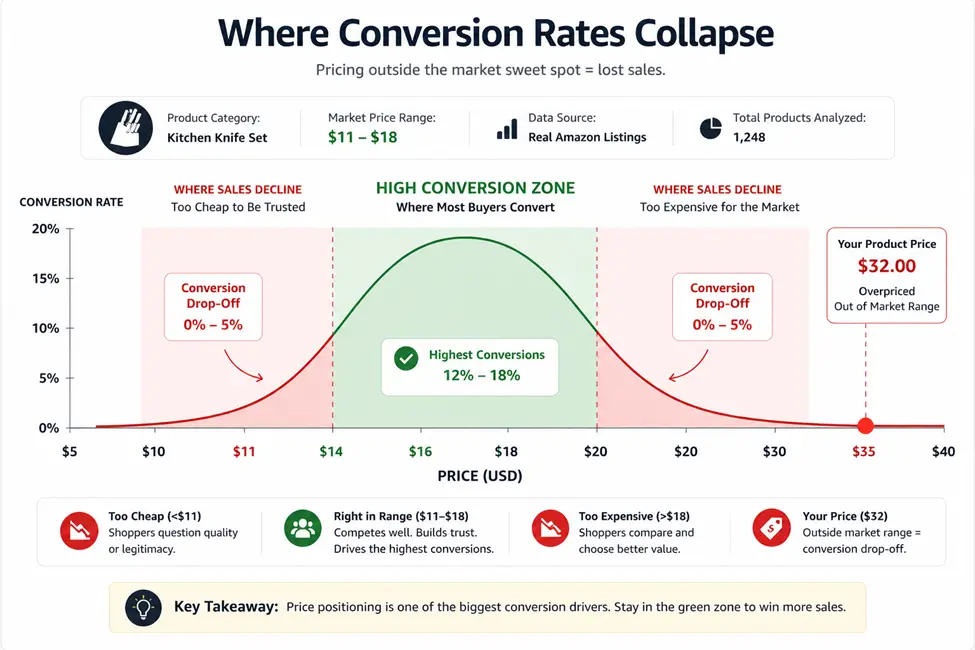
Pricing on Amazon isn’t just about being the cheapest. It’s about being priced in a range buyers trust for your product type.
If you’re selling a phone stand for $32 and the entire first page is priced between $11 and $18, your conversion will collapse no matter how good your listing looks. Buyers use price as a quality signal, but they also use it as a comparison benchmark. If you’re significantly above the page average without a clear reason (more reviews, better brand, better
images), you’re invisible to the majority of buyers, even if you’re technically showing up in search.
What This Is Costing You
Sellers underestimate this problem in terms of money and time.
Say your product is priced at $28 and you’re selling one unit per day when you should be selling eight to ten. At $28 per unit, that’s a difference of roughly $196 to $252 in daily revenue you’re leaving on the table. Over 60 days, that’s $12,000+ in lost sales. And that’s before you factor in the PPC spend that’s burning through budget with no return.
Here’s the part that stings more than the lost revenue. Every week your listing stays dead, it moves further down Amazon’s relevance queue. A listing that launches and struggles in its first 30 days is harder to rank six months later than it would have been if you’d fixed it in week two. The window to establish early momentum is real, and it closes.

How to Fix a Product That Is Not Selling on Amazon
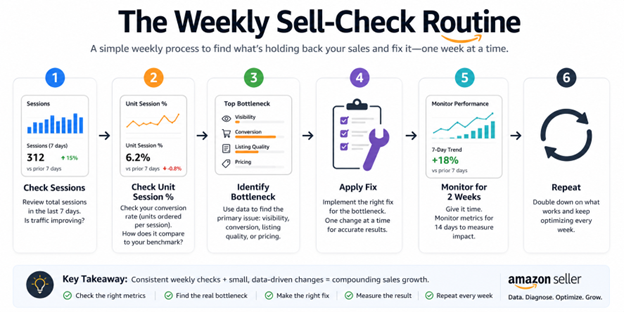
There’s a sequence here. Don’t skip steps, and don’t try to fix everything at once.
Step 1 – Diagnose First, Change Nothing
Pull your Business Reports for the last 30 days. You need two numbers:
- Sessions – how many people are viewing your listing
- Unit Session Percentage – what percentage of those people are buying
-
If sessions are low (under 20/day in most categories), you have a traffic problem. Fix visibility first.
If sessions are decent but the unit session percentage is under 8%, you have a conversion problem. Fix the listing before you increase ad spend.
If both are okay but sales are still flat, you likely have a pricing or review problem. Diagnose before you spend a dollar on ads.
Step 2 – Fix the Listing Foundation
Before you run any ads or drop your price, make sure your listing is actually built right.
Go through this checklist:
- Title includes primary keyword, is readable, and is under 200 characters
- The main image is clean, professional, and shows the product clearly at full zoom
- Bullet points address buyer questions (not just features, but benefits)
- Backend search terms are filled with relevant, non-repeated keywords
- A+ content is live if your brand is registered
- Price sits within 20% to 30% of the page average for your category
-
If any of those are missing, fix them before anything else. Ads on a broken listing are wasted money.
Step 3 – Build Early Sales Momentum
Amazon’s algorithm needs to see your listing convert to start showing it more. Early sales momentum matters more than almost anything else.
Options to generate that early velocity:
- Run aggressive PPC on exact-match keywords for your top 3 to 5 terms
- Offer a launch discount for the first 2 weeks to lower the conversion barrier
- Use Amazon Vine to start building reviews if you’re enrolled in Amazon Brand Registry
- Drive external traffic from social or email if you have an audience
The goal isn’t to give your product away. It’s to show Amazon that real buyers are clicking and buying. Once that signal is in the system, organic rank starts to climb.
Step 4 – Monitor and Adjust Weekly
Don’t set it and forget it. In the first 60 days after a fix or relaunch, check your sessions, unit session percentage, and organic rank weekly.
If sessions go up but conversion stays low, the listing still has a problem. If conversion is good but sessions are flat, the visibility fix hasn’t worked yet. Knowing which is which lets you adjust quickly instead of burning months on the wrong problem.
What Most Sellers Miss
Two patterns separate sellers who fix a dead listing fast from sellers who are still troubleshooting six months later.
The Indexation Gap Most Sellers Don’t Check
Your product might not be ranking for the keywords you think it’s ranking for. Amazon has to index your listing for a keyword before it can show up in the search for that term.
Check your indexation by searching for your ASIN combined with your primary keyword in Amazon search. If your product doesn’t appear, you’re not indexed for that term, and you’re invisible to everyone searching it. This is a common cause of “product is not selling” on newly launched listings, and most sellers never think to check it.
Review Velocity Beats Review Count
A listing with 20 reviews getting 3 per week is algorithmically stronger than a listing with 200 reviews getting none.
Amazon reads recent review activity as a signal of current relevance. If you launched and got early reviews but they’ve stopped coming in, the algorithm treats your listing as slowing down, even if your star rating is 4.7. Getting reviews moving again, not just accumulating them, is one of the fastest ways to boost sell on Amazon without changing the listing or the price.
When You Need More Than a DIY Fix
If you’ve been through this checklist and your product still isn’t moving after 30 to 45 days of targeted effort, the issue is usually one of two things: the listing was built with fundamental problems that are hard to see from inside it, or the launch strategy didn’t create enough early velocity to get the algorithm’s attention.
That’s not a failure of effort. It’s a diagnosis and execution problem. An experienced team can look at your listing from the outside, identify which ceiling you’re hitting, and run the fix in a coordinated way instead of one variable at a time.
Panda Boom works with sellers who are past the “waiting and hoping” stage and ready to run a real fix. We diagnose the actual bottleneck and build the solution around it, whether that’s a listing rebuild, a PPC strategy overhaul, or a proper product relaunch.
Frequently asked questions
1. Is Shopify better than Amazon for new brands?
It depends on your goal. The advantage is total brand ownership and 0% marketplace commission, while the downside is that you need to invest in acquiring every customer yourself. Amazon provides built-in traffic, while Brand Registry on Amazon helps protect your brand.
2. How does Brand Registry stop "listing hijackers"?
Once you enroll in Brand Registry Amazon, you get “Brand Catalog Lock.” This means only you can edit your product titles, images, and descriptions. It stops unauthorized sellers from changing your content or piggybacking on your hard-earned reputation.
3. What are the top Amazon Brand Registry Benefits for sales?
The biggest game-changers are A+ Content (visual storytelling) and Brand Analytics. These tools allow you to see exactly what customers typed to find you, helping you optimize your listings on both Amazon and your Shopify storefront.
4. Can I use Amazon Brand Registry Services without a trademark?
Not permanently. You need a registered (or pending) trademark. However, an Amazon Brand Registry Search through the “IP Accelerator” program can get you early access to protection tools while your legal paperwork is still in progress.
5. Why do brands use both Shopify and Amazon?
It’s a “Fortress Strategy.” Use Shopify to build a loyal community and collect emails, then use Brand Registry on Amazon to capture massive search volume and block counterfeiters from stealing your market share.
The Bottom Line
If my product is not selling on Amazon, the answer isn’t more tactics piled on top of a broken foundation. It’s figuring out which of the four root causes is actually yours (visibility, conversion, listing quality, or pricing) and fixing that one in the right sequence.
Diagnose first. Fix the actual bottleneck. Then build the momentum that tells Amazon’s algorithm your listing is on its way up.
If you’d rather not run that process alone, that’s what Panda Boom does.


