






 Help Center


- Why Your Amazon Listing Has Gone Dark
- Is This You? Quick Symptom Check
- The 4 Root Causes of Missing Amazon Search Impressions
- What Missing Impressions Are Actually Costing You
- The Fix: A Sequenced Approach to Recovering Amazon Keyword Impressions
- What Most Sellers Miss
- When to Bring in Outside Help
- Frequently asked questions
- Conclusion
Why Your Amazon Listing Has Gone Dark
You’ve done the work. The listing looks good. The photos are sharp. You’ve loaded up keywords. And yet your Amazon keyword impressions are flatlined, and the product barely shows up for searches that should be landing squarely on it.
That’s not a minor annoyance. Every impression you’re missing is a buyer who never even saw that you existed. No impression means no click, no conversion, no sale. You’re essentially invisible to the very people searching for exactly what you sell.
The good news is that this problem almost always has a diagnosable cause. It’s not random, and it’s not permanent. But you need to figure out which of the four root causes you’re dealing with before you start changing things. Fix the wrong layer, and you’ll waste weeks moving the wrong levers.
Is This You? Quick Symptom Check
If two or more of these describe your last 30 days, keep reading.
- Impressions are near zero on keywords you’ve specifically targeted
- Your listing doesn’t appear in search results, even when you type in your own backend keywords
- Sponsored ads show impressions, but organic impressions are missing for the same keywords
- You’re indexed for broad terms but not the high-value, specific keywords that actually convert
- A tool like Helium 10 or Data Dive shows you should rank for a keyword, but you’re nowhere to be found
- You recently changed your title or backend search terms, and impressions dropped shortly after
- A competitor selling a nearly identical product shows up consistently, while yours doesn’t
- Your BSR is sliding slowly, even though your conversion rate looks fine
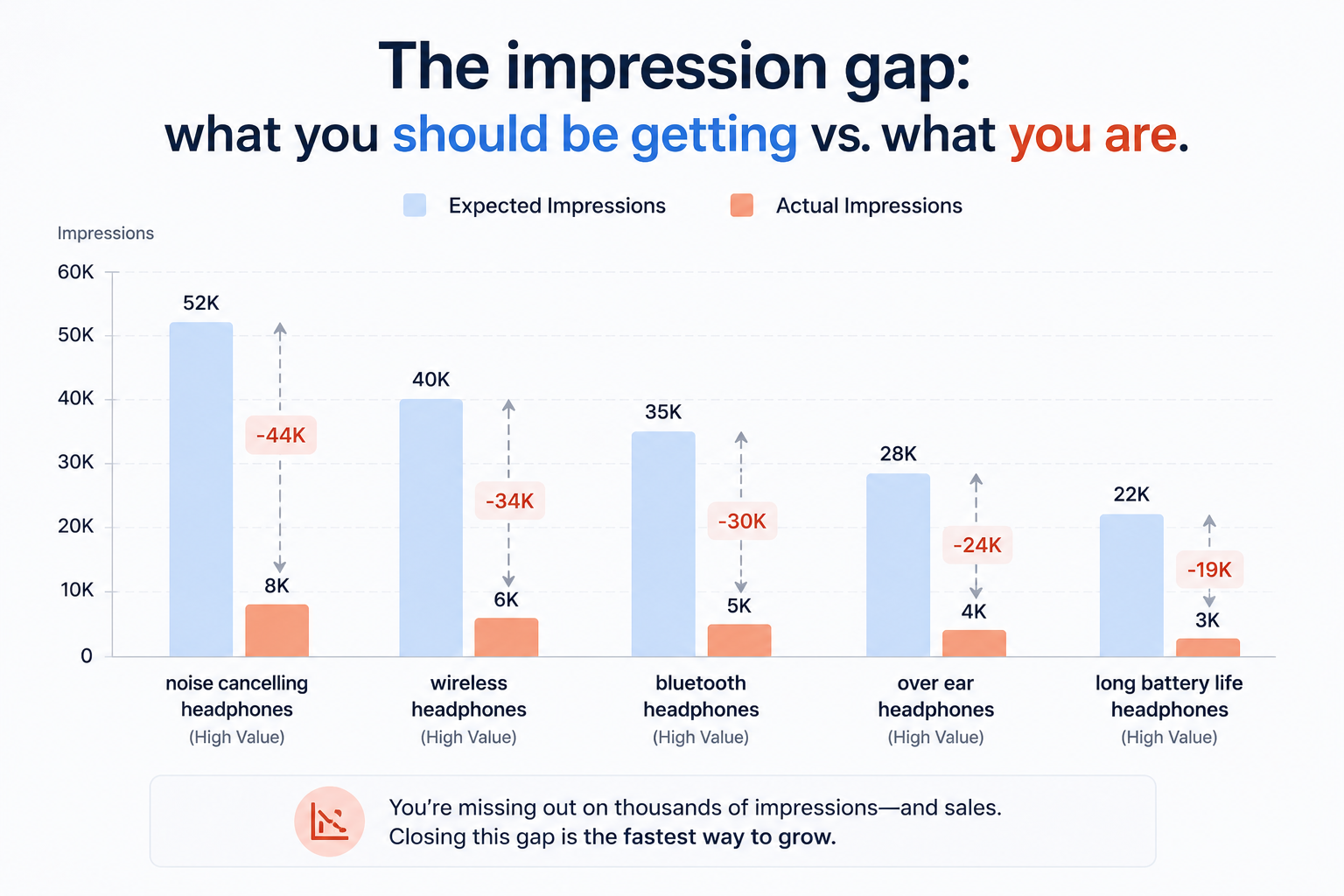
The 4 Root Causes of Missing Amazon Search Impressions
Forget the generic ‘add more keywords’ advice. At this level, missing impressions come from one of four specific problems. Sometimes two stack together. Rarely all four at once.
Cause 1: Your Listing Isn’t Indexed for That Keyword (Indexing Failure)
Amazon can only show your listing for a keyword if it knows your listing is relevant to that keyword. That awareness happens through indexation.
If Amazon hasn’t indexed you for a term, you get zero impressions for it, regardless of how much PPC budget you throw at it. Indexation is the floor everything else is built on.
Common reasons Amazon fails to index a listing for your target keywords include: the keyword isn’t in your title, bullet points, description, or backend search terms; your backend search terms exceeded the byte limit, and Amazon silently ignored the overflow; or you used commas or repeated words that Amazon’s parser tripped on.
But the quick check is simple: search the keyword in Amazon and add your ASIN to the URL like this: amazon.com/s?k=your+keyword&rh=p_6:YOUR_ASIN. If your product doesn’t appear, you’re not indexed.
Cause 2: Amazon Doesn’t Trust Your Relevance (Relevance Mismatch)
Being indexed and getting impressions aren’t the same thing. You can technically be indexed for a keyword and still receive near-zero impressions if Amazon’s algorithm doesn’t believe your listing is relevant enough to surface.
Amazon’s A9 and COSMO systems rank listings partially based on historical performance data. If buyers who searched for that keyword in the past ignored your listing (low CTR) or didn’t buy (low conversion), Amazon stops showing you. It’s a feedback loop that punishes listings that haven’t proven relevance through actual buyer behavior.
This is the most common cause for listings that show up occasionally but never consistently. The algorithm tested you, buyers didn’t engage, and Amazon pulled back on impressions.
Cause 3: Your Listing Has Been Suppressed or Flagged
Sometimes the problem isn’t the algorithm. It’s a compliance issue that Amazon hasn’t clearly communicated.
A listing can be partially or fully suppressed for several reasons: a missing required attribute in your product type, an image that violates guidelines, a pricing anomaly that triggered a ‘stranded inventory’ flag, or a category restriction you’ve bumped into. In many cases, Amazon doesn’t send a clear notification. The listing just quietly stops showing for certain searches.
Check your Seller Central Account Health and the ‘Fix Stranded Inventory’ section. Also, check the product detail page itself from a buyer account to see if any warnings or badges appear that buyers would see but that you might have missed from the backend.
Cause 4: Keyword Cannibalisation or Over-Dilution
This one surprises sellers. If you’re targeting too many keywords without enough content depth to support each one, Amazon’s algorithm may judge your listing as weakly relevant for all of them rather than strongly relevant for the important few.
Stuffing 250 bytes of unrelated keywords into your backend search terms sounds thorough. In practice, it can spread your relevance signal too thin. Amazon rewards listings that clearly, specifically, and consistently satisfy a particular search intent. A listing trying to capture 80 keyword clusters looks unfocused to the algorithm.
How to structure Amazon backend search terms for maximum indexation
What Missing Impressions Are Actually Costing You
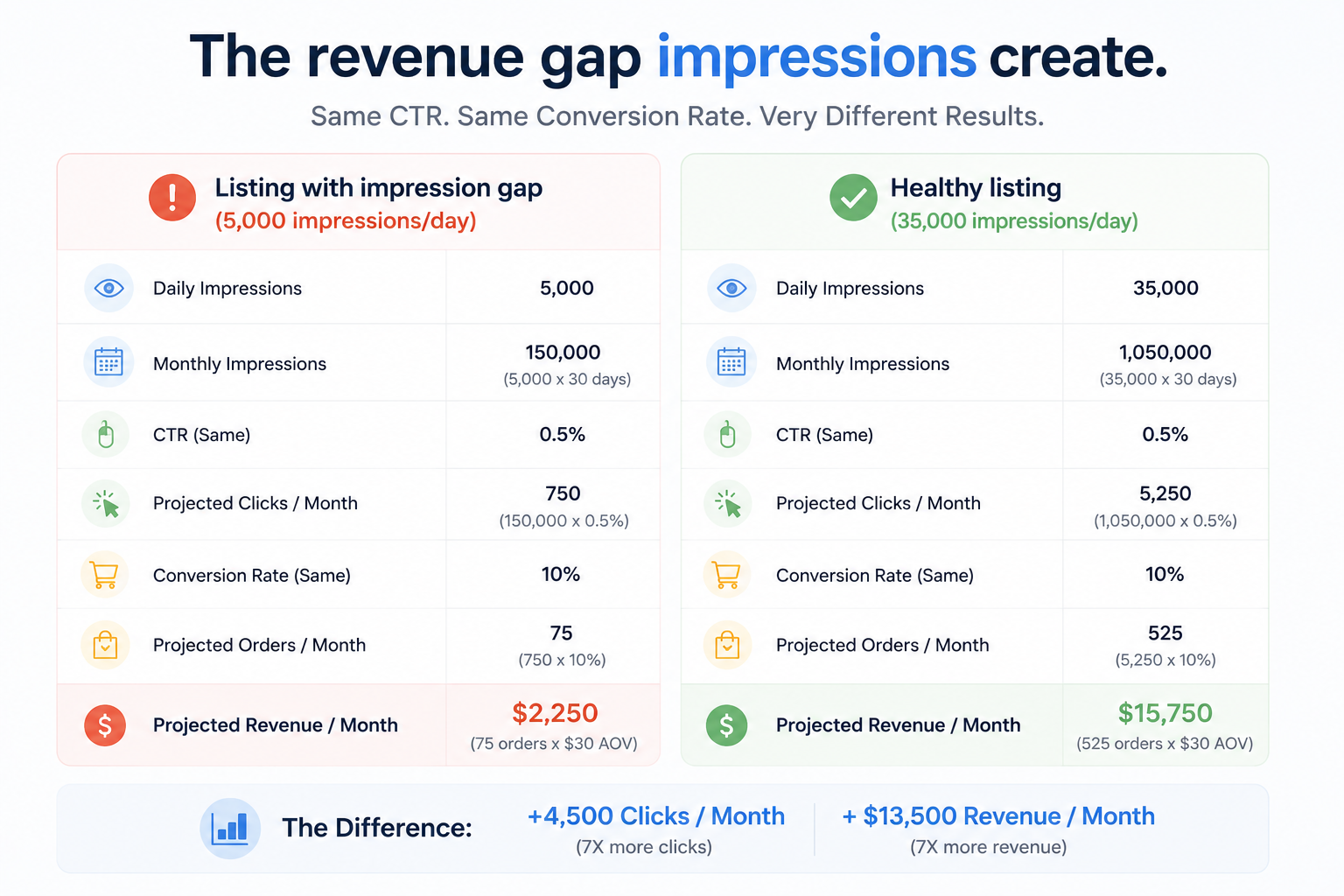
Sellers tend to track sales, conversion rate, and ACOS. They often overlook impressions until the hole is large enough to see in revenue.
Here’s the math that makes this concrete. Say your listing averages a 3% CTR and a 15% conversion rate on sessions. For every 10,000 impressions you’re missing per day, you’re losing approximately 300 clicks and 45 potential sales. At a $30 average order value, that’s over $1,300 in daily revenue that’s invisible to you.
The compounding effect is worse. Amazon’s algorithm rewards listing momentum. A listing with consistently low impressions gets labeled as low-relevance over time, which makes it harder to recover even after you fix the underlying problem. The algorithm’s confidence in your listing decays month over month.
The Fix: A Sequenced Approach to Recovering Amazon Keyword Impressions
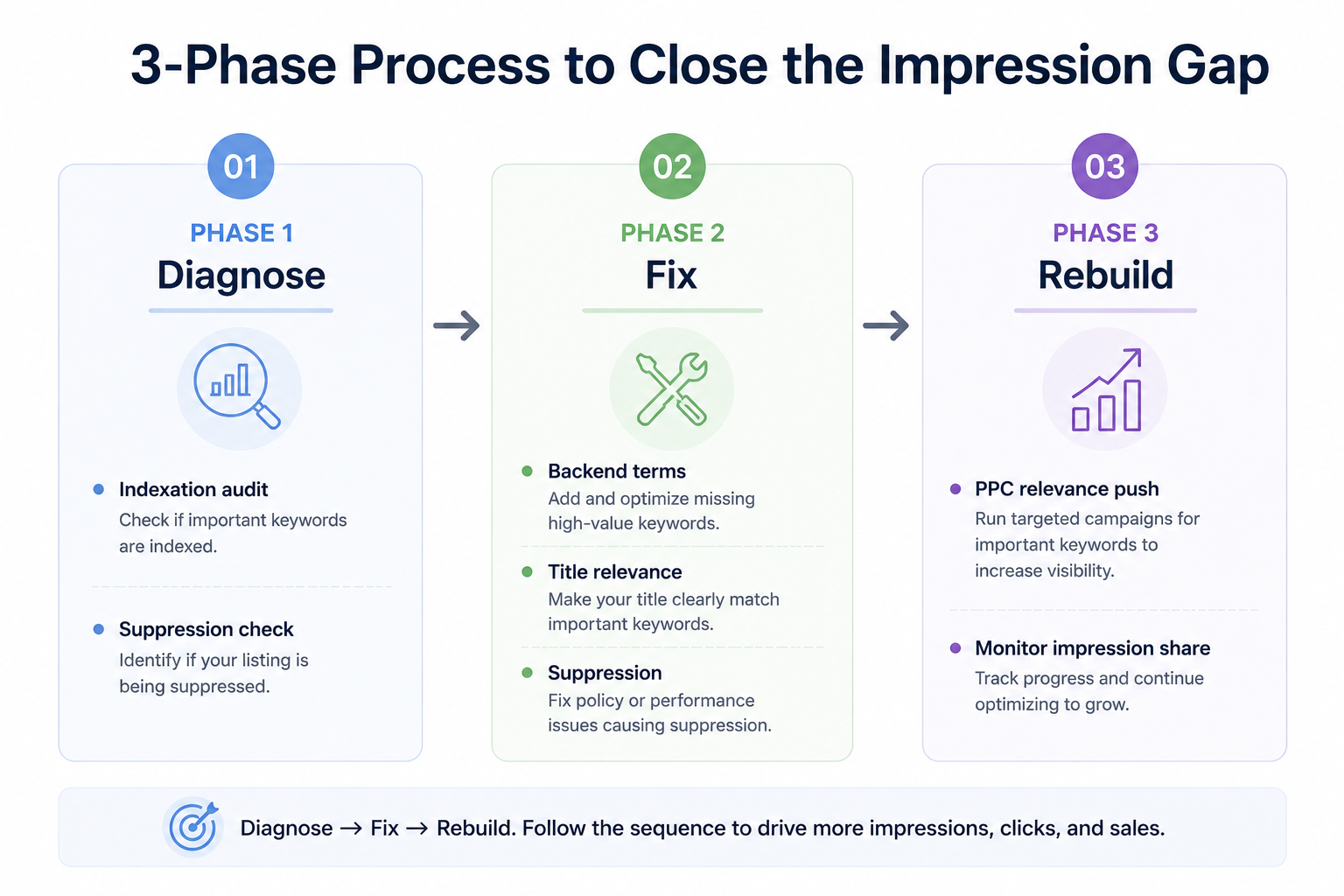
Don’t change everything at once. If you do, you won’t know what worked. Run this in sequence.
Step 1: Audit Your Indexation Status
Before anything else, confirm exactly which keywords you’re indexed for and which you aren’t. Don’t assume.
Use the ASIN+keyword search method described above for your top 10 to 15 target keywords. Build a simple spreadsheet: keyword, indexed (yes/no), impressions last 30 days, organic rank. This is your baseline.
For any keyword where you’re not indexed: check whether it appears in your title, bullets, or backend search terms. If not, add it. If it was in backend search terms but still isn’t indexed, you may have a byte-limit overflow or formatting issue.
Step 2: Fix Your Backend Search Terms (The Right Way)
Amazon’s backend search term field allows up to 250 bytes. Not characters. Bytes. Accent characters and special characters consume more than one byte each.
Rules that matter most:
- No commas (Amazon’s parser reads them as separators, which wastes bytes)
- No repeated words. If ‘yoga mat’ is in your title, don’t include it again in backend terms
- No filler like ‘best’, ‘top’, or ‘buy now’. These waste space and don’t help indexation
- Include misspellings and regional variants only if they’re genuinely high-search-volume terms
After updating, wait 48 to 72 hours before testing indexation again. Amazon doesn’t index changes instantly.
Step 3: Rebuild Relevance Signals Through PPC
If the problem is relevance mismatch (Cause 2), you need to prove relevance to Amazon through buyer behavior. The fastest way to do that is with a targeted PPC campaign.
Run exact-match campaigns on the specific keywords where you need impressions. Set bids above the suggested amount to guarantee placement. The goal isn’t immediate profitability; it’s generating the CTR and conversion signals that tell Amazon’s algorithm your listing satisfies that search intent.
Once your organic relevance signal rebuilds, Amazon will start surfacing you organically for those terms, and your dependency on paid placement decreases.
Step 4: Optimize the Listing for Relevance, Not Just Keywords
Keyword presence gets you indexed. Keyword relevance gets you impressions. And relevance, in Amazon’s view, means your listing answers the buyer’s search intent better than the alternatives.
For your highest-priority keywords, check the top 3 organic results. What do their titles emphasize? What do their main images show? What do their bullets lead with? Compare that to yours. If they’re surfacing features, use cases, or benefits that your listing glosses over, that’s the gap.
A title rewrite alone, focused on leading with the most buyer-intent-matching language for your primary keyword, can meaningfully move impression share within a few weeks.
Step 5: Fix Any Suppression Issues
Check Seller Central for active listing issues. Go to Manage Inventory, filter for ‘suppressed listings’, and address every flag. Even minor issues, like a missing product dimension or a low-resolution secondary image, can limit how Amazon distributes your listing.
If you’re in a gated category or a category that requires specific attributes (like Safety Data Sheets for certain chemicals, or certifications for children’s products), make sure all required documentation is uploaded and current.
What Most Sellers Miss
Insight 1: Impression Share Is a Zero-Sum Game
Every search result page has a fixed number of impressions to distribute. When you’re not getting them, someone else is. That’s not a metaphor. Amazon search impressions don’t grow to fill demand. They’re rationed by the algorithm based on relevance scores, bid levels, and performance history.
This means improving your impression share isn’t just about fixing your own listing. It’s about outperforming the listings the algorithm currently prefers. You’re not competing against some abstract standard. You’re competing against specific ASINs that are currently winning impressions you should be capturing.
Run a competitor gap analysis: find the 3 to 5 ASINs that rank consistently on your target keywords. Check their titles for keyword placement, their review velocity, their price range, and their image quality. The gap between them and you is your fix list.
Insight 2: Sponsored Impressions Don’t Guarantee Organic Indexation
A common misconception: if your PPC ads are showing, you must be indexed for that keyword organically. Not true.
Amazon’s advertising system can display your ad for a keyword even when your listing isn’t organically indexed for it. The ad match type (broad, phrase, auto) often reaches keywords for which your listing has no organic relevance signal. So you can be spending PPC budget on a keyword while having zero organic impressions for it.
Always verify organic indexation separately from ad performance. The two systems talk to each other over time (PPC conversions do contribute to organic relevance), but they don’t mirror each other in the short term.
When to Bring in Outside Help
If you’re past $20k per month in revenue, the cost of staying invisible for your primary keywords is high, and it compounds. Six months of suppressed impressions means six months of slower review velocity, weakening BSR trajectory, and competitors consolidating positions that get harder to reclaim over time.
The diagnosis part, figuring out which of the four causes is actually limiting your impressions and in which order to address them, is where most sellers lose time. They fix the symptom they can see (adding more keywords) instead of the cause (indexation failure, suppression, relevance decay).
If you’d rather run an expert audit than spend another month troubleshooting,
Amazon listing visibility audit
We identify which keywords you’re losing and why, then run the fix sequence as a single coordinated effort rather than three disconnected experiments.
Frequently asked questions
1. Why is my Amazon listing not getting impressions even though I've added keywords?
Adding keywords doesn’t guarantee impressions. Low impressions usually mean Amazon sees weak relevance or engagement for those search terms.
2. How long does it take to recover Amazon keyword impressions after fixing the listing?
Indexing updates can appear within 48–72 hours, but impression recovery typically takes 2–6 weeks as Amazon gathers new performance data.
3. Why isn't my product indexed for keywords in my backend search terms?
Common causes include exceeding Amazon’s byte limit, duplicate keywords, or formatting issues. Review and rebuild the backend search terms if needed.
4. Does PPC help with organic Amazon keyword impressions?
Yes. Strong PPC performance can improve organic rankings over time by showing Amazon that your listing converts for those keywords.
5. What causes sudden drops in Amazon search impressions?
The main causes are listing suppressions, recent listing changes affecting indexing, or competitors taking market share. Check Account Health and recent edits first.
Conclusion
If your listing isn’t getting Amazon keyword impressions for the terms that matter, the answer isn’t adding more keywords. It’s figuring out which of the four causes is limiting you: indexation failure, relevance decay, suppression, or keyword dilution. Each one has a specific fix, and they need to be addressed in the right sequence.
Diagnose first. Fix the actual bottleneck. Then run a short PPC push to rebuild the relevance signal that tells Amazon your listing deserves to be seen. That’s the path from invisible to indexed to driving consistent organic traffic.


